Showing posts with label eLearning. Show all posts


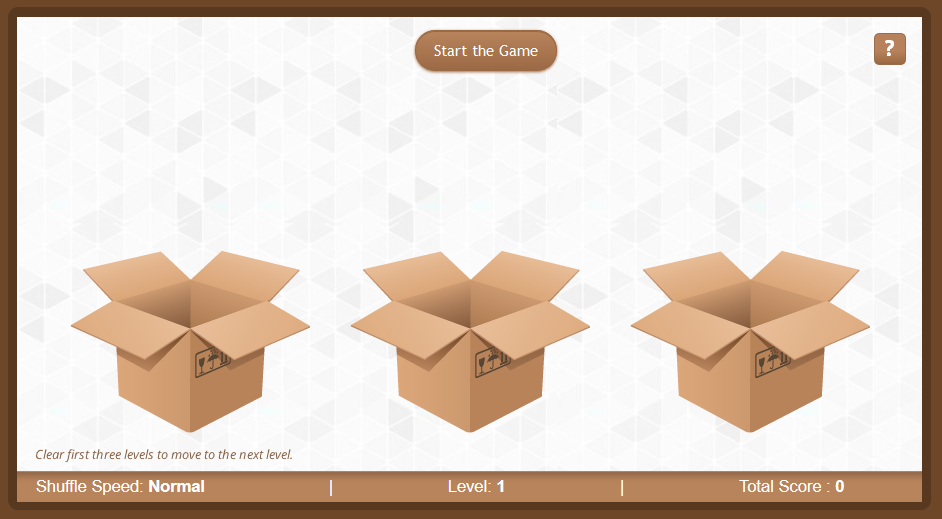
Hello everyone, here's an example of  gamification in e-Learning. The main aim of this game is to improve user’s concentration skills along with providing him information about skateboarding.

Here cute and notorious Kick Buttowski jumps into one of the 3 available boxes randomly and the boxes start shuffling on click of "Start the Game" button. 


The user needs to focus and keep track of the box in which Kick Buttowski is and click it to get him out,


but beware..if the user chooses the wrong box, there is a punishment, yes you guessed it right, the user will have to answer a random question about skateboarding, fetched from a question bank.


The game play is divided into 3 main slides based on the shuffle speed (Normal, Moderate and Insane).


1) Normal - In normal speed mode, the users will have 3 chances to find the correct box and for each correct find they will be awarded 20 points. Just in case a user fails to find the correct box in which Kick Buttowski is, he will be redirected to a random question about skateboarding.
  • On correctly identifying the box in which Kick is: POINTS AWARDED 20
  • On correctly answering the question: POINTS AWARDED 10
  • On incorrect answer : NO POINTS AWARDED.
 
 
2) Moderate - In moderate speed mode, again the users will have 3 chances to find the correct boxes and for each correct find they will be awarded 20 points. In this case the shuffle speed is higher than the normal speed mode and a separate question bank that contains questions of slightly higher difficulty level is used.
  • On correctly identifying the box in which Kick is: POINTS AWARDED 20
  • On correctly answering the question: POINTS AWARDED 10
  • On incorrect answer : NO POINTS AWARDED.

3) Insane- In Insane mode, the users will have 4 chances to find the correct boxes and for each correct find they will be awarded 20 points. Here the users will have to give it their all as the shuffle speed is twice the moderate speed and the question bank contains really difficult questions.
  • On correctly identifying the box in which Kick is: POINTS AWARDED 20
  • On correctly answering the question: POINTS AWARDED 10
  • On incorrect answer : NO POINTS AWARDED.

The maximum score that a user can attain is 200. On completing all levels, the following slide will be displayed:


-----------------------------------------Whats under the hood?-------------------------------------------
  • Used a web object that allows me to shuffle the boxes seamlessly and created variables in JavaScript to bridge the gap between SL2 and JS. 
  • As shown below, I have created 3 Different slides for different speed levels (Normal/ Moderate/ Insane)
  • The blank slides that you see below are used for redirecting to the appropriate speed level.
  • I have created 3 different question banks, 1 for each speed level. All of them have 9 Questions each.
  • Question bank 1 has easy questions for normal speed level.
  • Question bank 2 has slightly difficult questions for moderate speed level.
  • Question bank 3 has very difficult questions for Insane speed level.
  • Every time a wrong box is clicked, a random value is fetched (any value from 1 to 5) and according to that random value corresponding slide with question comes up.

Here's the demo link: https://goo.gl/iDMrDF

This Example is Inspired by "Find Candies" shuffle game,created by Avinash Sharma.

If we have designed a visually appealing and compelling training program. Do you think such training program is enough to glue the learners to their seats?  Let us accept the truth that, for a learner our training program is just another training program. He/she will do any or all of the following while taking the training –take calls, chat, check mail, talk to a colleague, wonder how long the training program is going to last, and so on. I am sure everybody has done all these in school/college. So, why should our learners be any different?

Learner’s real world is full of distractions. So, it is very important to grab the learner’s attention. The first event “Gain Attention” out of Gagne’s nine events still holds good in today’s learning environment.

I am a great fan of this “Gain attention” strategy. The first few seconds/minutes of a training program plays a crucial role in deciding its fate. The learner may just leave the training in the middle or click ‘Next’ continuously to complete it. If first impression is not positive, the great ID strategies may just fall on deaf ears.

Gain attention strategy plays an effective role in eLearning. It has the power to increase the motivational level of your learner.Gain Attention:

  •  Arouses the learner’s curiosity
  • Sets an expectation in the learner’s mind: What’s in the training for me?/ What is the training all about.
  • Makes the learner think about a particular concept: Really?/ No way!/ So true?
  • Helps the learner grasp what is going to be covered in the training
Basically, a gain attention strategy will build a curiosity in the learner’s mind to see what comes ahead. The learner is actually interested in taking the training program.

We have talked enough about the importance of “Gain Attention”. Now, the question arises “What qualifies as a gain attention strategy?”

The different types of ‘gain attention’ can include:

1.  Pretests: Holds good for learners who believe they know everything and there is nothing more to learn. The objective is to enable the learners to understand where they stand at the beginning of the training program.Example: Before staring the training, let us answer a few questions

 2.  Challenge: This holds good for demotivated learners.
Example: You are a technical assistant. You have several customers who require your assistance.  How many customers can you serve in a day?

3. Problem solution approach: Builds the curiosity in the learner to solve the problem.
Example: You have been appointed a manager of a team whose performance has been very poor over the past few months. How will you motivate your team and ensure that each member gives his/her best.

4.  Did you know? : Share facts that will really inspire and surprise the learners.

5.   Comic strip: Use comic characters to talk about a particular topic/situation.

6.  Story/scenario: Make the learners understand with a scenario or through characters in the scenario.
Example: There’s a city where lot of school going children have been missing over the last two months. You being a part of the investigation department, have been assigned this case. You need to go to the city and solve the mystery.

There are several other innovative ways to design grab attention screens. If you have come across any, please feel free to share them.

Grabbing The Learner's Attention


The whole purpose of designing and developing an eLearning course is lost if the audience it is made for chooses to leave it midway. The audience here is the king. If the audience disapproves of an eLearning course, all the efforts and time spent into making the course go to waste. Goes without saying, the key stakeholders are held responsible for the failure of this course. The key stakeholders being SMEs, Instructional designers, multimedia developers, etc. After putting in all their effort and time, they don’t expect their product (eLearning course) to fare poorly in the market. They expect to receive satisfactory, if not great, reviews from their audience. Disappointed at the reviews they have received, they wish to find out the reason behind this failure. On giving their course a closer look, they have found out that the course has certain gaps and they have also understood that they didn’t take some important points into account. The points that they missed are:

Not clear who the audience are
Before designing, one should be clear who the audience are. Then the team should work on how to meet the course objective as per the audience.

There was lack of flow in the course
While designing and developing a course, the entire learning and development team must strive to build a course that is orderly structured, i.e. in a proper sequence. Although you develop your sequence during the outline phase, you may need to constantly revise it. Make sure you check for the mention of terms and concepts that were not previously defined. If this happens, you’ll need to go back and revise the outline so learners are introduced to the basics before being moved to the more advanced concepts. Also, the learning course must be developed in a way such that the readers/viewers stay hooked or remain engaged throughout the length of the course.

The course was overloaded with unnecessary and irrelevant information
While developing an eLearning course, we feel that it should be rich in information. With a view to make the course information rich, we tend to load the course with images, audio and onscreen text. As a result, the learner finds it difficult to go through the course as there is too much information to process. The course should not be cluttered. We should include visual images, onscreen text and audio only when it is necessary.

The sentences used were not simple. Mostly passive form of sentences were used.

The listener understands the speaker better if they are being addressed to directly in the speech. It is always better to say, “He said these words” instead of saying, “These words were said by him.” It is best to use an active, rather than passive, sentence construction. With an active construction, the subject of the sentence performs an action. With a passive construction, the subject does not take a direct action, so the sentence feels weak. So in order to connect better to the audience, the instructional designers/writers should always use active form while structuring content.

Things to Keep in Mind While Developing eLearning Courses


This time we are in with a new game-“Eye- Power”. Let’s just check how sharp your eyes are…!!! All you need to do is to find different shade in a color family.


DemoLink:  https://11500b08d80c55b6233c5764576388fdbfcf5453www.googledrive.com/host/0B76gL4TsG5SKM0dsUURpaTgwNmM/

Eye-Power...!!

Do you know how many videos view does You Tube gets per day? Believe it or not it’s four billion!! As per You Tube figures, site has One Billion active users each month. That’s the power of videos. Talking in e-learning context, videos are becoming one of the most popular e-learning formats. Adding videos in e-learning courses can help your organization to meet its learning objectives. Videos offer asynchronous learning that can help users to grasp the topic more clearly as compared to reading live instructions.


Here are some tips on how videos can be made more effective for e-learning:

1.  Decide wisely the video length
The length of the videos should be wisely decide. Videos need to be short, concise and to the point. In case of instructional or informational videos the length can be little longer but not more than 10 minutes. Videos should contain short portion of information which is easy to grasp for the learner.

2.  Bring Transcript into play
Videos must be accompanied with transcript with them. It is not necessary that every learner has headphones and sound cards with them.

3.  Interactive is the key
Videos should be interactive, in order to keep the audience engaged, involved and focused on the points you want to highlight. If not so, ask your learners for some feedback, add some quizzes or end your video with a quick summary of the key points.

4.  Consider video file size
The video files should be compressed well. Slow loading videos causes the frustration among the learners. Separate version of videos can also be made, which can easily play on low bandwidths.

5.  Be little creative
Videos can be used to show scenarios and simulations. Videos can be very well leveraged for creating immersive scenarios like “what to do” or “how to do” kind of situations. With the help of videos, it makes it easy to simulate a real-life situation.


How to make Videos more effective for e-learning?


  1. Infographics are easy to understand: It creates a lasting visual impression on mind by providing relevant information in form of graphics with minimal words explaining them. This manner of providing concise data is very easy to read and remember by learner. People retain approximately 80% of what they learn usually as opposed to 20% retained by reading.
  2.  Infographics saves time: As content is summarized with graphical presentations, keywords and concise data which helps in saving the time of the learners. Human brain process visual scenes 60,000X faster than text.
  3. Infographics are easy to share:Attractive Infographics has a higher ability of to be shared on social networks and become viral than the ordinary text content.
  4. Infographics provides chances to be creative: There is no standard templates for designing Infographics. Each one is different and one can always play with colors, formats, fonts and styles.
  5. Infographics creates brand advocacy: While designing an infographic, a logo of the brand should be embedded always. Whenever, it will be shared or liked on social networking sites gives free advertising to the brand.
  6. Infographics will help you to show your expertise: The research required for creating an infographic will display your knowledge and position you as an expert on your category or topic.

6 Reasons for why should you use Info graphics in eLearning

Here is our small Creative Interactive introduction. We have developed this using slider in  Articulate Storyline 2. 


DemoLink:www.googledrive.com/host/0B5squJFW_DOpfmJybERqa1N4MTdZVnA1NzFpM0x6Y0ZJdzZXM3VZM3RmZGJXNldGRjFpTUk

Interactive Slider Illustration


 Click on the image to view the full animated graphic

Readers let’s explore today the importance of mLearning or Mobile Learning in imparting eLearning courses. E-learning refers to any kind of learning and teaching which is electronically supported. The use of any form of digital communication, electronic devices or internet to deliver learning along with the education technology falls under eLearning. The term mlearning is narrower than eLearning. Actually, mlearning simply means an eLearning that can be accessed via mobile. This type of learning can be accessed via portable devices which allows students to learn in different environment according to their wish.

With the escalation of mobile devices in our day to day life mLearning is getting lots of press. Moreover, the increased capabilities of today’s smartphones also influence learners to witness mLearning experiences. The term mLearning has grown enormously in the past few years. A recent Cisco reports revels that an average 21 year adult spends approximate 5000 hours on video games, 10,000 hours on phone and receives 250,000 emails a year.

Training organizations are under pressure to support learners at the time and place of need, using the devices that the learners are using. This means developing both instructional and support content for the mobile environment in spite of any difficulties.

The future is mobile, and so too will be learning. We can argue about when this whole mobile revolution started, and there were certainly highly capable smartphones like the BlackBerry available before the introduction of the iPhone and the iTunes App Store, but that’s when we actually began to see the potential and the impact mobile would have on our generation. Since then, mobile devices and apps have only gotten better, faster, and more innovative, and if there’s something the app development community has shown us, time and time again, it’s that mobile offers new possibilities never possible on PCs. This is precisely how we should think about mLearning as compared to eLearning.

There are a lot of reasons why you might want to go mobile. Understanding the reasons why will help you make important course design decisions. While this isn’t a comprehensive list, here are four major reasons to go with a mobile solution:
·        User convenience: People who have mobile devices often want to access content on them. They may want to take a course or look up the steps to a process on the train home from work, while sitting in a comfy chair, or on a “second screen” while working on their computers. In this case, you may not really need to alter traditional course or performance support design, but rather just want it to play well on the mobile device. z
·        Mobile workforce: You may have a workforce that is rarely at a desk with a computer. This could be anyone from a traveling salesperson to a retail associate to a warehouse worker. These users may not have the option of using a PC or Mac and must use a mobile device.
·         Mobile need: This option is a subset of “mobile workforce” and includes situations in which the user is not near a computer at the time of need. This makes it a performance issue (I need to look up product data while on the sales floor) instead of just a time-management issue (It’s convenient to take my compliance training while I’m on the road).
·        Mobile device features: You may have a learning need that benefits from integration with a mobile device’s features, such as the camera, contacts, GPS, or accelerometer. Tapping into these features requires special programming and will rule out many rapid authoring tools.

The relevance of mLearning in eLearning

The abstract of Blended Learning is in its name only. The word blended means merging one substance with another to form a new combination. In e-learning context, Blended Learning is comprehensive learning solution that uses traditional classroom learning methodology with web-based online learning to deliver content.

Blended Learning Model is raising its popularity due the increase usage of mobile devices, laptops and tablets in our daily lives. A successful blend should always be planned around the organization’s learning objectives and available infrastructural facilities. In fact, Blended Learning can prove to be extremely effective if implemented properly.

 There are certain factors which should kept in mind right from the designing and development process of Blended learning program:
  •    The right mix of the strategies which depends on your course content, size, and culture.
  • The targeted learners also influence the planning process. A blend should be made in keeping targeted learners in mind.
  • The planning of learning system must be guarded with infrastructural facilities.
  • The proposed learning system should be multiple device friendly.


6 Blended Learning Models

Overview of Blended Learning